Vetra
Designing a mobile operations platform for large-scale camera deployment and monitoring
" Vetra , an AI-powered control platform that transforms dense operational data into focused, human-centered tools teams rely on every day."

Client
Role
Industry
Date
The problem
As the camera infrastructure expanded across stores, operational teams struggled to manage deployments and monitor camera health efficiently from the field.
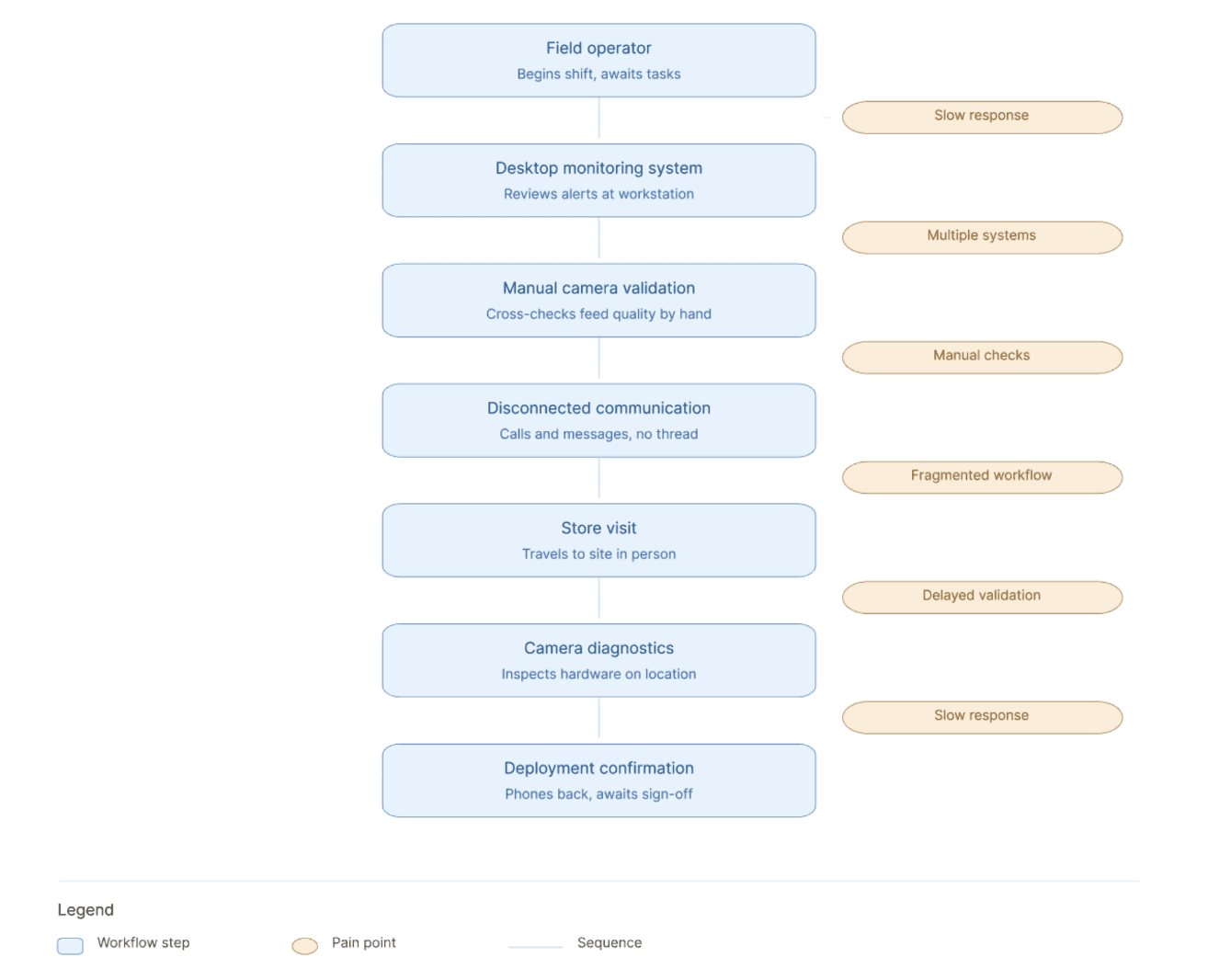
Most workflows still relied heavily on desktop systems, fragmented communication, and manual verification processes.
Simple operational tasks often required too many steps :
checking store deployment status
validating camera connectivity
reviewing live feeds
diagnosing issues
coordinating with field teams
This created delays during deployments and slowed operational response when issues occurred on-site.
The challenge wasn’t lack of monitoring. It was the absence of a mobile-first operational workflow designed for fast decision-making in the field.
Research / Constraints
The product needed to support users operating in real field conditions :
moving between locations
working under time pressure
switching quickly between monitoring and action
Through stakeholder discussions and workflow reviews, several operational constraints became clear :
Mobile usage
Users needed immediate visibility and quick actions without navigating deep workflows.
Field conditions
The app had to remain clear and usable in dynamic operational environments.
Quick response
Operators needed to move from awareness to action within seconds.
Connectivity
Deployment validation and camera diagnostics needed to remain lightweight and reliable.
Status clarity
The most important information had to remain visible at all times without overwhelming the interface.
These insights shaped the product architecture and prioritization strategy across the app.
The Solution
The final experience was designed around three core operational workflows.
1. Store Monitoring
The landing experience focuses on store-level operational visibility.
Instead of opening directly into technical camera lists, the app surfaces :
deployment health
operational status
issue indicators
location overview
This helped teams prioritize attention quickly before diving into detailed diagnostics.
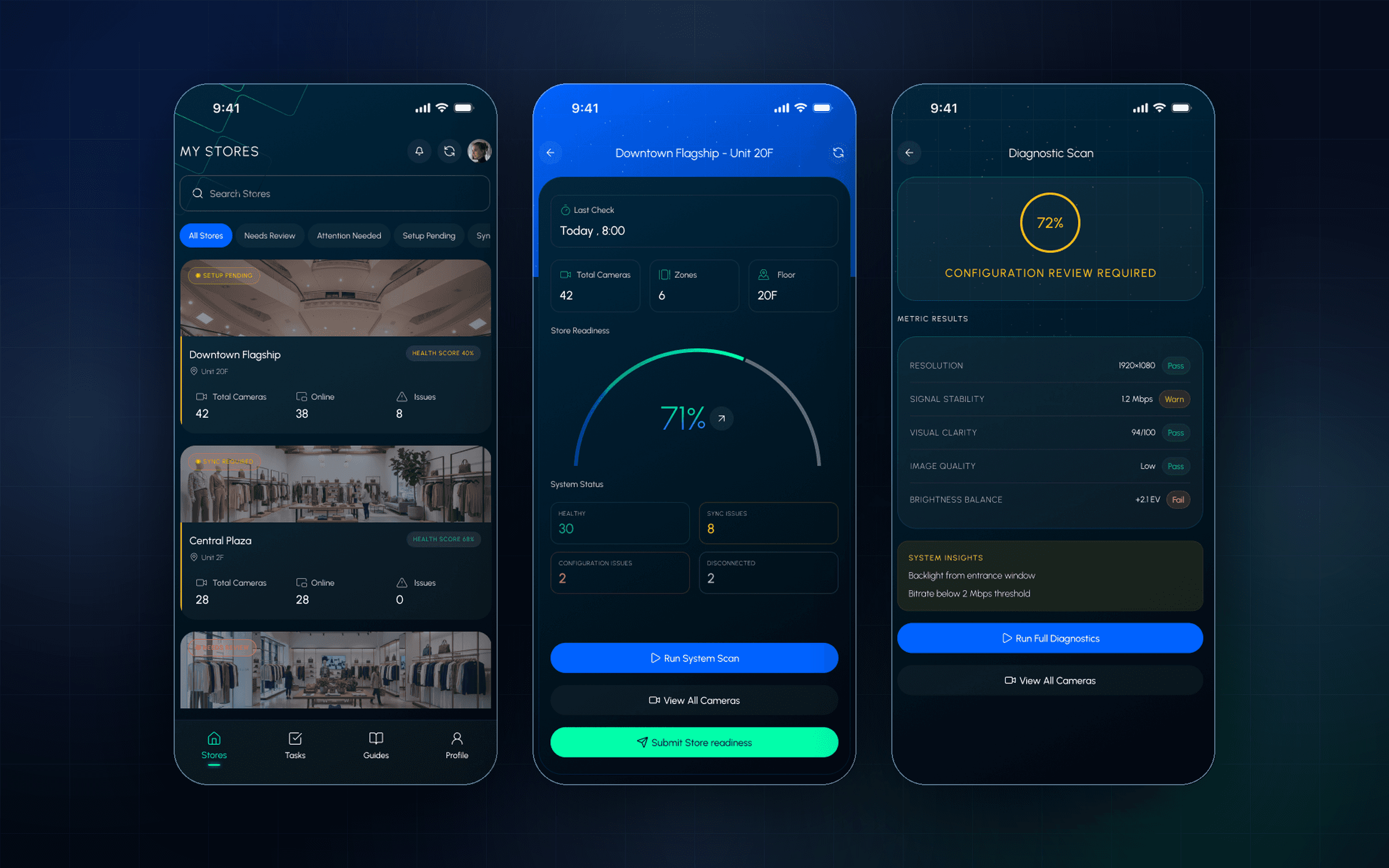
The store overview provides quick visibility across deployment locations and operational status.
2. Camera Health & Live View
Camera-level workflows were designed to simplify deployment validation and issue diagnosis directly from mobile.
Operators can :
check camera health
validate connectivity
access live feeds
review operational details
troubleshoot deployment issues
The interface prioritizes status clarity first while progressively exposing deeper technical information when needed.

Camera workflows combine live validation, diagnostics, and operational visibility within a mobile-first experience.
3. Tasks & Operational Guidance
The app also supports lightweight operational execution workflows for field teams.
Integrated tasks and guidance flows help operators :
track pending actions
review deployment steps
follow operational procedures
validate completion directly from mobile
This reduced dependency on external communication and disconnected documentation.

Outcomes
The final product provided operational teams with :
faster deployment validation
centralized mobile visibility
improved camera health monitoring
streamlined field workflows
quicker operational response across stores
Most importantly, the app transformed fragmented deployment processes into a unified mobile operational experience optimized for real field conditions.
Projects